




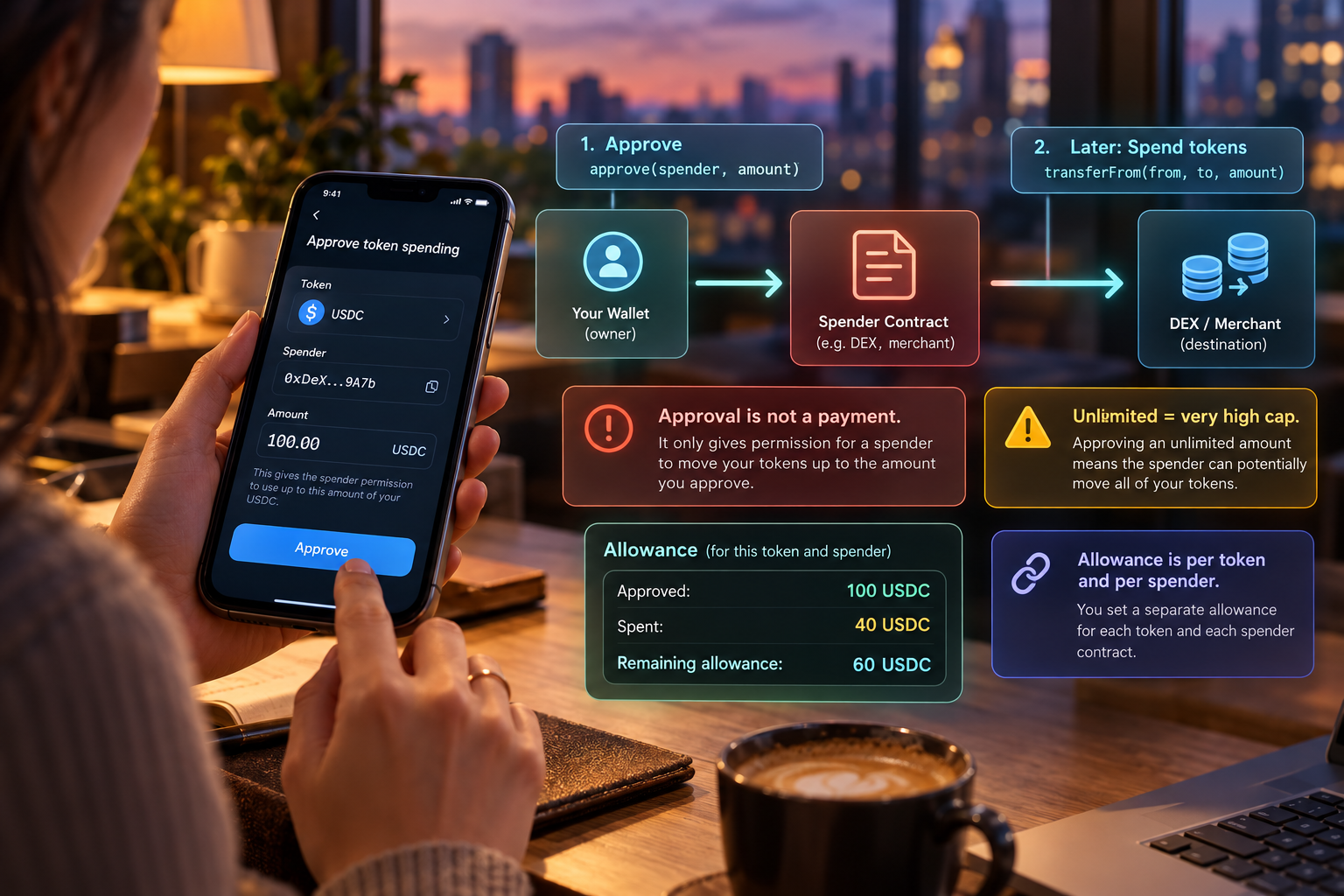
An ERC-20 token keeps its own ledger inside a contract. You do not hand a token to another application by attaching it to a message. You either transfer it, or you approve a spender to transfer it later. The second path is the one that surprises people, because the wallet shows a signature or a transaction and the tokens do not appear to move.
The two fields that matter
EIP-20 specifies approve(spender, amount). If that call succeeds, the contract records an allowance: the spender may transfer up to amount of the caller’s tokens. The mechanism for the later move is transferFrom(from, to, amount), which the spender calls. It must not exceed the remaining allowance, and it decreases the allowance by the amount used. allowance(owner, spender) reads what is left.
So an approval is a budget for a particular contract, denominated in that token, until the budget is used or replaced. It is not ETH gas. It is not a general permission over the wallet. A different token is a different contract with its own allowances. A different spender is a different budget.
Why wallets show “unlimited”
The amount is an integer. Interfaces often offer the maximum integer the field can hold, because a trading contract can then pull tokens many times without asking for a new approval. “Unlimited” is that interface choice. On chain it is a very large allowance, not a magic flag. The spender can move the tokens you hold, up to that number, for as long as the allowance stands. If you later buy more of the same token, a maxed allowance still covers them.
EIP-20 itself warns that changing an allowance from one non-zero value to another non-zero value has a race: a spender might use the old allowance before the new one lands. Wallets and contracts work around that in different ways. The practical reading is simpler. Look at the spender address and the amount. If you do not know what the spender is, you do not know who can call transferFrom.
How to read the prompt
A transfer prompt and an approval prompt are different transactions. In a transfer, you are the one moving tokens to a recipient. In an approval, you are naming a spender and a ceiling. A later transaction, which you may never see in your own wallet history as something you initiated, can move the tokens if the spender sends it.
Before confirming, read the token contract, the spender, and the amount. Prefer an amount near the size of the trade you actually want, if the interface allows it. Afterward, read allowance rather than trusting the website that asked. Setting the allowance back to zero is the ordinary way to retire a budget you no longer want. None of this makes a known spender safe. It tells you what the approval itself authorizes, which is narrower than “connect,” and wider than a single payment if the amount is huge.
A small allowance, walked through
EIP-20’s own logic is easier with small integers than with the maximum uint256. Suppose the token uses six decimals and you approve a spender for 100 tokens. The allowance stored for that pair of addresses is 100. The spender later calls transferFrom for 40. If you still hold at least 40, the transfer succeeds and the allowance becomes 60. A second call for 70 fails the allowance check even if your balance would cover it. A call for 60 succeeds and leaves an allowance of zero. Nothing in that sequence required you to sign the transfers. You signed the approval. The spender signed the transfers.
Now change the approval to the maximum integer the type holds. There is no practical second call that fails the allowance check because of size. The check that remains is your balance. That is what an “unlimited” button writes down. It is still one spender and one token. It is not a session that expires when you close the site, unless the contract you approved contains its own expiry and you have read that code. EIP-20’s allowance does not expire by itself. Replacing a non-zero allowance with another non-zero number has the race the EIP describes: the spender can still use the old value before the change is mined. Set the allowance to zero, wait, then set the new amount.